
Substation Automation & Protection System Unit (Relion Series Component)
⚠️ Important Note: Prior to handling, installing, or servicing the module, ensure all auxiliary power supplies and primary current/voltage transformer secondary circuits are fully isolated to prevent shock hazards or accidental equipment tripping.
📋 Product Overview
The ABB 1MRK002247-AGr02 is a specialized electronic module designed for integration into ABB’s Relion family of protection and control IEDs (Intelligent Electronic Devices), such as the 670 and 650 series. Operating within advanced substation automation architectures, this unit supports critical functions such as signal acquisition, communication routing, or internal logic processing to maintain high grid reliability.
Built to withstand severe electromagnetic environments, the 1MRK002247-AGr02 module features industrial-grade noise immunity and robust hardware design, making it an essential OEM replacement component for maintaining system integrity in utility and industrial power networks.
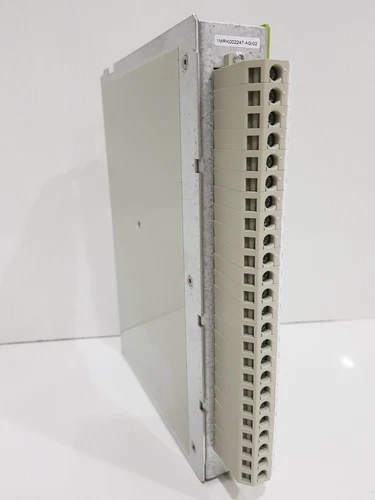
📊 Technical Datasheet
| Parameter | Value |
| Brand | ABB |
| Model / Part Number | 1MRK002247-AGr02 |
| Product Series | Relion Series (Protection & Control) |
| Product Description | Processing & Interface Module |
| Condition Status | New / Pre-Owned Industrial Surplus |
| Dimensions (W x H x D) | 160 mm x 100 mm x 30 mm |
| Approximate Weight | 0.55 kg (1.21 lbs) |
| Country of Origin | Sweden |
| Operating Power Supply | System Backplane / 24 VDC Nominal |
| Power Consumption | Max. 8 W |
🚀 Initial Operation Checklist
🔍 Visual Structural Inspection: Inspect the outer casing, circuit board surface, backplane connectors, and mounting points for signs of physical cracking, bent connector pins, or thermal discoloration.
⚡ Supply Rail Check: Verify that the host IED rack power supply module delivers stable, nominal voltage within acceptable tolerances before module insertion.
🔌 Connector Alignment: Guide the board carefully into the sub-rack slots to ensure edge connectors align precisely with the backplane without applying excessive force.
🖥️ Status LED Boot Check: Power up the host IED and observe the front module/rack LEDs to confirm successful self-test initialization and normal operation mode.
🛡️ Grounding Verification: Ensure the sub-rack chassis is firmly bonded to the main substation earth grounding grid to shield against high-frequency electrical transients.
🛠️ Daily & Routine Maintenance
🧹 Keep the module faceplate and surrounding sub-rack free of dust, oils, and particulate matter using dry compressed air or clean micro-fiber cloths.
🔩 Inspect rack mounting screws and card locking levers periodically to prevent module loosening caused by cabinet vibration.
🌡️ Ensure enclosure ventilation slots and cabinet cooling fans remain clean and unobstructed to allow continuous heat dissipation.
📦 Store spare or decommissioned units inside conductive ESD shielding bags in a dry, temperature-controlled environment.
🔧 Troubleshooting & Fault Diagnosis
❌ No LED / Power Failure: Check internal sub-rack power connections, confirm backplane fuse integrity, and verify primary auxiliary DC voltage feeding the IED.
⚠️ Communication Error / Bus Fault: Check backplane pin seating, inspect fiber-optic or copper bus connections, and verify node addresses using ABB PCM600 configuration software.
⚡ Analog / Digital Signal Errors: Check field wiring terminal blocks, verify CT/VT secondary input wiring, and ensure signal cables are properly shielded.
🔘 System Self-Test Alarm: Query the host IED event log via PCM600 or the local HMI panel to obtain specific diagnostic fault codes linked to the module slot.
⚠️ Safety Guidelines & Warnings
⚡ High Voltage Hazard: De-energize all CT/VT input lines and control voltage supplies before touching rear terminal blocks or removing modules from the rack.
⚡ ESD Protection: Always wear a grounded wrist strap when handling exposed printed circuit boards to protect sensitive microcontrollers from electrostatic damage.
🔥 Overcurrent Protection: Ensure auxiliary control circuits powering the IED sub-rack are equipped with properly rated fast-acting fuses or circuit breakers.
👨🔧 Qualified Personnel Only: Installation, programming, and module swaps should be performed exclusively by certified protection and control engineers.
❓ Frequently Asked Questions (Q&A)
💬 Q: What primary equipment family uses the ABB 1MRK002247-AGr02 module?
A: This part number belongs to ABB’s Relion protection and control platform (such as the IED670 or IED650 series) used in substation protection systems.
💬 Q: What does the “r02” extension signify in the part number?
A: “r02” (or Rev 02) indicates the specific hardware revision level, which ensures component compatibility with particular backplanes and firmware releases.
💬 Q: Can this module be hot-swapped while the protection IED is energized?
A: Hot-swapping is generally not recommended unless specified by the host system manual. Isolating the IED power supply before module extraction prevents electrical arcs and system trips.
💬 Q: How can I configure or diagnose this module?
A: Detailed diagnostics, parameter settings, and hardware mapping are managed via ABB’s PCM600 (Protection and Control IED Manager) software suite connected to the main IED unit.

