
Product Description
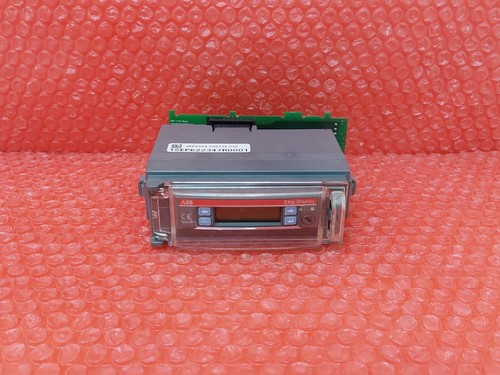
The ABB 1SEP622347R0001 is an ITS2.1 control unit designed for ABB SlimLine XR switch-disconnector fuse systems. The ITS2.1 is an intelligent control and monitoring unit that supports local operation, electrical measurement, and communication with energy management or supervisory systems.
When configured with compatible equipment, the unit can provide current, voltage, power, energy, fuse-status, and switch-position information. It also supports remote monitoring and control through an RS-485 Modbus RTU communication interface.
The supplied listing references Ekip Display, XR1, ITS2, and rear identification 1SEP619337R0001. Check the complete assembly and connector configuration before ordering. The ITS2.1 control unit and the separately fitted Ekip Display are distinct components.
Product Parameters
- Brand: ABB
- Model: 1SEP622347R0001
- Product Name: XR ITS2.1 Control Unit
- Product Series: SlimLine XR
- Product Type: Intelligent Control and Monitoring Unit
- Related Identification: 1SEP619337R0001
- Application: ABB SlimLine XR switch-disconnector fuse systems
- Supported Switch Sizes: XR00, XR1, XR2, XR3
- Communication Interface: RS-485
- Communication Protocol: Modbus RTU
- Monitoring Functions: Current, voltage, power, energy, and equipment status, depending on configuration
- Place of Manufacture: Not confirmed
- Product Condition: Not specified
- Dimensions: Not confirmed
- Weight: Not confirmed
- Country of Origin: Not confirmed
- Power Requirements: Confirm using the unit nameplate and installation documentation
- Discontinued Status: Not confirmed
Installation and Commissioning
- Isolate the switchgear and follow the required electrical safety procedures.
- Confirm that the control unit is intended for the installed SlimLine XR switch size.
- Inspect the housing, connectors, terminals, and mounting points.
- Install the unit according to the ABB mechanical and electrical instructions.
- Configure the switch type, rated current, nominal voltage, and power-feed direction as applicable.
- Set the Modbus communication address, baud rate, parity, and communication parameters to match the supervisory system.
- Verify measurement readings, fuse-status indications, communication, and supported control functions before returning the equipment to service.
Daily Maintenance and Care
- Check the front panel and status indicators for abnormal conditions.
- Inspect accessible connectors and communication wiring for looseness or damage.
- Keep the control unit and switchgear enclosure clean and dry.
- Review communication alarms and measurement readings during routine inspections.
- Check configuration parameters after replacement or maintenance work.
- Record firmware and configuration information where available.
Troubleshooting and Common Problems
- Incorrect current readings: Check the configured rated current and switch type.
- Incorrect voltage readings: Verify nominal voltage and power-feed direction settings.
- Fuse-blown indication problems: Check the fuse-monitoring configuration and associated wiring.
- No Modbus communication: Verify RS-485 polarity, wiring, slave address, baud rate, parity, and termination.
- Remote operation failure: Check the control configuration, switch operating mechanism, and communication status.
- Display or status indication problems: Inspect the connected display/interface and control-unit connections.
Safety Precautions
- Installation and commissioning must be performed by qualified electrical personnel.
- Isolate the switchgear and verify the absence of hazardous voltage before handling the unit.
- Never modify wiring or communication connections while energized unless explicitly permitted by the manufacturer’s instructions.
- Verify switch size, rated current, voltage settings, and communication parameters before operation.
- Test remote commands and switching functions under an approved commissioning procedure.
Recommended ABB Models
The following are related ABB switchgear, ITS, and Ekip products. They are not all direct replacements for 1SEP622347R0001.
- ABB 1SEP621859R0001 – XR ITS2.1 Control Unit
- ABB 1SEP621860R0001 – XR ITS2.D Control Unit with Display
- ABB 1SEP621862R0001 – Ekip Display Accessory for ITS2.1
- ABB 1SEP619403P0001 – ITS2 / ITS2.1 / ITS2.D Multiplug
- ABB 1SEP622641R0001 – ITS2.1 Multiplug Spare Part
- ABB 1SEP622750P0001 – ITS2.1 User Manual Reference
- ABB Ekip Touch – Electronic Protection Trip Unit
- ABB Ekip Hi-Touch – Advanced Electronic Protection Trip Unit
- ABB Ekip Dip – Electronic Protection Trip Unit
- ABB Ekip Measuring Pro – Measurement Accessory
- ABB Ekip Com Modbus RTU – Modbus Communication Module
- ABB Ekip Com Ethernet – Ethernet Communication Module
- ABB SlimLine XR – Switch-Disconnector Fuse Series
- ABB SlimLine XRG – Switch-Disconnector Fuse Series
- ABB Tmax XT – Low-Voltage Molded-Case Circuit Breaker Series

