
Product Description
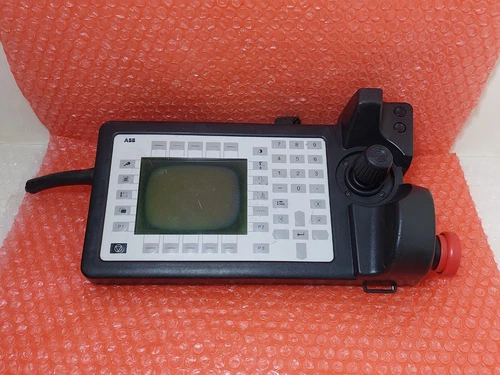
The ABB TPU2 (3HNE00313-1) Rev. 16 is a handheld robot teach pendant designed for ABB S4C and S4C+ robot controller systems. It provides an operator interface for robot programming, manual jogging, parameter adjustment, system monitoring, and maintenance operations.
Equipped with a backlit LCD display and an integrated keypad, the pendant allows operators and engineers to interact directly with the robot controller. It supports program editing, motion control, I/O monitoring, and robot status inspection.
The TPU2 also incorporates an emergency-stop button and a three-position enabling device for supervised manual operation. It is commonly associated with ABB industrial robot systems, including compatible IRB robot installations.
This unit is intended for legacy ABB robotics applications and should not be confused with newer color touchscreen FlexPendant models.
Main Functions and Applications
- Robot program creation, editing, and modification.
- Manual robot jogging and axis positioning.
- Robot operating-status and diagnostic monitoring.
- I/O signal inspection and control.
- Access to robot configuration and operating parameters.
- Emergency-stop operation.
- Three-position enabling device for manual operation.
- Backlit LCD interface for operation in industrial environments.
- Maintenance and commissioning of compatible ABB S4C/S4C+ robot systems.
Product Parameters
- Brand: ABB
- Product Series: TPU2
- Model: 3HNE00313-1
- Revision: Rev. 16
- Product Name: Robot Teach Pendant / Programming Unit
- Product Type: Handheld Robot Programming Terminal
- Controller Compatibility: ABB S4C / S4C+
- Controller Generations: M97, M98, M99, M2000
- Display: Backlit monochrome LCD
- Input Interface: Integrated keypad and function keys
- Safety Features: Emergency-stop button and three-position enabling device
- Communication: Dedicated ABB controller pendant interface
- Supply Voltage: 18–30 VDC
- Cable: Dedicated pendant cable; verify whether included
- Display Resolution: Verify against hardware revision
- Product Status: Legacy product
- Country of Origin: Sweden
- Product Net Weight: Approximately 2.4 kg
- Dimensions: Verify physical measurements
- Power Requirements: Supplied by the compatible robot controller
Installation and Commissioning
- Verify the model number 3HNE00313-1 and Rev. 16 marking.
- Confirm that the robot controller supports the TPU2 programming unit.
- Inspect the pendant housing, LCD, keypad, emergency-stop button, enabling device, and cable connector.
- Switch off the robot controller before connecting or disconnecting the pendant.
- Connect the dedicated cable securely to the controller’s pendant interface.
- Restore controller power and allow the pendant to complete its startup sequence.
- Check the display, keypad, and communication status.
- Verify the emergency-stop circuit and three-position enabling device according to the approved safety procedure.
- Test manual jogging at an appropriate reduced speed.
- Confirm program editing, I/O monitoring, and controller communication before normal operation.
Daily Maintenance and Care
- Inspect the pendant cable and connector for wear or mechanical damage.
- Check the LCD backlight and display readability.
- Test keypad buttons for normal response.
- Inspect the emergency-stop button for correct mechanical operation.
- Check the three-position enabling device for reliable operation.
- Keep the pendant clean and free from oil, dust, and moisture.
- Avoid dropping or pulling the pendant by its cable.
- Store the unit in a protected location when not in use.
Troubleshooting and Common Problems
Problem: Pendant does not power on
- Check the controller power supply.
- Inspect the pendant cable and connector.
- Verify that the controller pendant interface is functioning.
Problem: Display remains blank
- Check the LCD backlight and display condition.
- Inspect the cable connection.
- Verify the controller startup status.
Problem: Startup remains in progress
- Check communication between the pendant and robot controller.
- Inspect the pendant communication interface and cable.
- Review controller diagnostic messages.
Problem: Keypad buttons do not respond
- Check for damaged or worn membrane keys.
- Inspect the keypad connection.
- Arrange professional repair if input faults persist.
Problem: Robot cannot be enabled for manual operation
- Check the three-position enabling device.
- Verify emergency-stop circuit status.
- Confirm that controller operating mode and safety conditions are correct.
Problem: Intermittent communication
- Inspect the cable and connector contacts.
- Check for damaged pins or cable strain.
- Verify compatibility with the installed controller generation.
Safety Precautions
- Only trained and authorized personnel should operate the robot using the teach pendant.
- Never bypass the emergency-stop or enabling-device safety circuits.
- Always maintain a clear view of the robot working area during manual operation.
- Use the appropriate reduced-speed mode during teaching and commissioning.
- Do not connect or disconnect the pendant while the controller is energized unless the applicable ABB documentation explicitly permits it.
- Verify the safety functions before returning the robot to automatic operation.
- Keep the emergency-stop button accessible during robot teaching.
Recommended ABB Models
The following are related ABB robot teach pendants, programming units, and robot-control components. They are not all direct replacements for TPU2 3HNE00313-1.
- 3HNE00314-1 – S4C teach pendant without backlight
- 3HNE00311-1 – ABB S4 teach pendant with backlight
- 3HNE00312-1 – ABB S4 robotic teach pendant
- 3HNE00026-1 – S4 teach pendant without backlight
- 3HNE00028-1 – S4 teach pendant with backlight
- 3HNE00442-1 – TPU2-EX teach pendant for paint robots
- 3HAB5386-1 – ABB S4/S4C+ teach pendant
- 3HAB5387-1 – ABB S4/S4C+ teach pendant
- 3HNE07665-1 – ABB robot teach pendant
- 3HNM05345-1 – ABB robot teach pendant
- 3HAC022286-001 – ABB FlexPendant
- 3HAC023195-001 – ABB robot pendant-related accessory
- DSQC 352A – ABB robot controller I/O board
- DSQC 506 – ABB robot controller module
- DSQC 639 – ABB robot controller module
Before ordering, verify the controller generation, pendant connector, cable configuration, revision, and safety-device operation. Newer FlexPendant models use a different interface and should not be assumed compatible with TPU2 systems.

