
The Honeywell 51196694-300/U1 is an integrated operator input device featuring both a keyboard and a trackball, specifically engineered for the AID-3 series consoles. This module provides essential ergonomic functionality for operators managing complex processes within Honeywell control systems. It allows for high-precision cursor movement and reliable data entry, ensuring that control room staff can interact with their HMI software with speed and accuracy. Built for industrial environments, this unit delivers the rugged performance required for continuous daily operations. You can find more information about this model on our product portal.
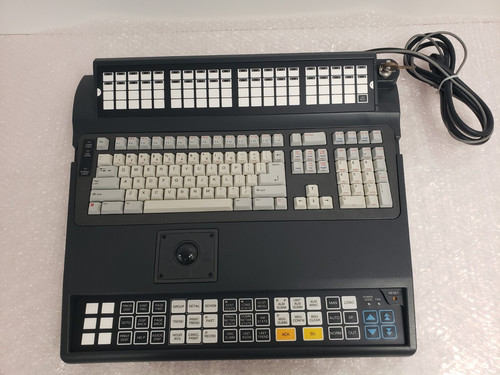
Technical Specifications
-
Model Number: 51196694-300/U1
-
Device Type: Keyboard and Trackball Integrated Interface
-
Dimensions: Standard console-mount footprint, approximately 350mm x 220mm x 70mm
-
Weight: Approximately 1.2 kg
-
Country of Origin: USA / International
-
Connectivity: Dedicated multi-pin industrial cable interface
-
Operating Environment: Designed for climate-controlled control room operations
Application Areas
The 51196694-300/U1 is specifically utilized in critical monitoring and control environments:
-
Central Control Rooms (CCR)
-
DCS Workstation operator interfaces
-
Supervisory Control and Data Acquisition (SCADA) monitoring nodes
-
Industrial safety management console stations
-
Large-scale process visualization and management systems
Product Usage Instructions
-
Preparation: Power down the connected HMI workstation to prevent potential short-circuiting during the installation process.
-
Installation: Position the keyboard/trackball unit into the console mounting recess and secure it using the provided mounting hardware.
-
Cable Connection: Route the interface cable through the console arm or housing and connect it securely to the workstation’s I/O port.
-
Calibration: Upon initial power-up, ensure the system software recognizes the trackball input. If sensitivity is too high or low, adjust the pointer speed settings within the operating system or HMI software.
-
Maintenance: Periodically remove the trackball housing to clean out any dust or debris from the optical sensors to ensure smooth tracking performance.
Frequently Asked Questions (Q&A)
Q: What does the “/U1” designation indicate? A: The “/U1” suffix usually denotes a specific hardware version or regional variation of the keyboard assembly; it is important to confirm compatibility with your console’s revision before ordering. Q: Why is the trackball sticking or skipping during use? A: This is usually due to dust accumulation on the internal bearings or the optical sensor. Cleaning the trackball housing and bearings typically restores smooth operation. Q: Is this keyboard waterproof? A: While it is designed for industrial use and is resistant to environmental dust, it is not waterproof; avoid spilling liquids on the unit and clean it only with approved electronics-safe dry cloths.
Recommended Similar Models
-
Honeywell 51196694-300-RP
-
Honeywell 51196694-100
-
Honeywell 51305085-100
-
Honeywell 51199568-100/B
-
Honeywell 51204160-175

