
¥99,999.00 Original price was: ¥99,999.00.¥1,588.00Current price is: ¥1,588.00.
This image and price are not for reference. If you need to inquire, please contact me!
🌍Country of origin: USA France Germany Estonia Norway UK
⌚Delivery date: in stock
🛠After-sales service: brand new with one year warranty
⚙️ Product Category: Module/Controller/Server/Motor/Touch Screen
🕰Warranty: 12 months/365 days
☎️ Please contact me: 15359029662 Ms. Amy Sun
📎Chinese official website: www.dcsplcabb.com
📩Email: geabbamy@gmail.com
💬Whatsapp: +86 15359029662
If you have any products that you cannot find, you can consult anytime.


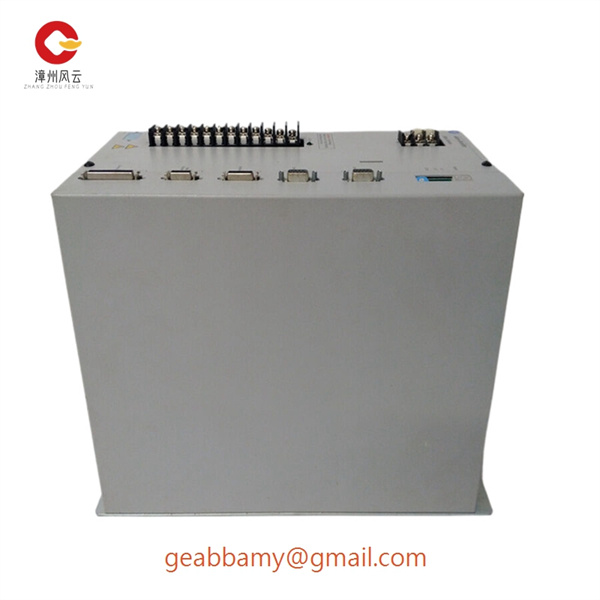
Model: ECU01 / ECU01.5
Brand: EMG
Series: EMG Industrial Control Panel Series
Core Function: Local operator interface for equipment monitoring and control.
Product Type: Control Panel / Operator Interface Module
Key Specifications: Local display, operating controls, industrial control-system integration
Communication: RS-232 and Modbus RTU are reported for ECU01.5 by secondary supplier documentation; verify exact hardware.
Controller Platform: 500 Series (as stated in the supplied listing)
Supply Status: Seller-refurbished listing
Stock: Confirm before ordering
Warranty: Confirm with supplier
Shipping From: China
Manufacturer: EMG
Model: ECU01 / ECU01.5
Product Category: Industrial Control Panel Module
Product Function: Operator display and control interface
Installation: Industrial control cabinet / panel installation
Display Function: Local operating information and parameter display
Operating Modes: Manual, automatic, external, and central operation are described in secondary product information.
Communication Interface: RS-232, subject to exact revision verification
Communication Protocol: Modbus RTU, reported for ECU01.5
Signal Processing: Process monitoring and signal handling, depending on system configuration
Power Requirements: Not reliably established for the exact ECU01 listing
Dimensions: Exact model-specific dimensions require confirmation
Weight: Exact net weight requires confirmation
Country of Origin: Listing identifies China; other supplier references differ
Product Condition: Seller Refurbished, according to the supplied eBay listing
Technical note: Some online descriptions mix ECU01.5 specifications with ECU02.5 specifications. Do not use unverified voltage, temperature, touchscreen, or I/O figures when preparing cabinet drawings.
In industrial production lines, operators need direct access to machine status, process values, and operating commands. When a legacy control panel fails, operators may lose access to local monitoring and manual intervention functions.
Replacing the original EMG panel can preserve the existing cabinet layout and operator workflow. However, the replacement must match the controller interface and software configuration.
1. Steel Processing – Strip Position Control
Used in EMG control environments where operators monitor strip position and equipment operating conditions.
2. Metallurgical Production Lines
Supports local machine operation and process monitoring in industrial production equipment.
3. Industrial Control Cabinets
Provides a local operator interface for displaying equipment parameters and accessing operating functions.
4. Equipment Maintenance and Retrofit
Serves as a replacement spare when an existing ECU01.5 panel develops display or operating problems.
5. Centralized Process Monitoring
Supports communication with a higher-level control system where the installed configuration provides the required interface.
Illustrative engineering scenario.
A steel-processing facility experiences intermittent display failures on an existing EMG operator panel.
The maintenance team discovers that the main controller remains operational, but operators cannot reliably access local machine information.
The replacement procedure includes:
Recording the original ECU01.5 nameplate and hardware revision.
Photographing terminal connections and wiring.
Backing up communication and operating parameters.
Checking the replacement panel’s interface and mounting dimensions.
Testing operator commands and displayed process values.
Confirming communication with the existing controller.
The goal is to replace the failed operator interface without unnecessarily changing the existing machine-control architecture.
The following models require careful distinction.
| Model | Function | Compatibility Assessment |
|---|---|---|
| EMG ECU01 | Earlier control panel designation | Verify hardware revision |
| EMG ECU01.5 | Original replacement target | Preferred same-model replacement |
| EMG ECU02.5 | Newer control panel generation | Potential upgrade; engineering verification required |
ECU02.5 is described by secondary suppliers as a successor to ECU01.5. However, a confirmed drop-in replacement specification was not established.
Apter Power+1
ECU01.5 → ECU01.5
Retains the original model designation.
Check connector arrangement and hardware revision.
Compare firmware and communication settings.
Verify the original panel configuration before installation.
ECU01.5 → ECU02.5
Potential upgrade path.
Verify mounting dimensions and power requirements.
Check communication protocol and terminal assignments.
Confirm parameter migration and operating-mode compatibility.
Test all operator commands before commissioning.
There is insufficient verified information to classify ECU02.5 as a direct drop-in replacement.
| Fault Symptom | Possible Cause | Module Relevance | Quick Check | Recommended Action |
|---|---|---|---|---|
| Display does not power on | Supply failure or internal fault | High | Measure supply at designated terminals | Check power wiring and panel |
| Display is blank | Display or internal electronics fault | High | Check startup indicators | Inspect or replace panel |
| Communication failure | Cable, configuration, or interface fault | High | Check RS-232 connections if fitted | Verify communication settings |
| Incorrect displayed values | Signal mapping or configuration error | Medium | Compare with controller values | Check parameter mapping |
| Operating commands unavailable | Keypad or control-interface fault | High | Test individual controls | Inspect operator interface |
| Intermittent operation | Loose connector or unstable supply | Medium | Inspect connections and supply | Correct wiring and retest |
1. Check power supply
Use a multimeter to measure the panel supply at the designated power terminals.
Compare the reading with the actual nameplate specification.
Inspect fuses and terminal connections.
Do not assume a 24 V DC supply without checking the exact revision.
2. Check display operation
Inspect the panel during startup.
Check status indicators.
Look for damaged display areas, loose connections, or visible component damage.
3. Check communication
If the installed version uses RS-232:
Inspect the communication cable.
Verify connector pin assignments.
Check baud rate, parity, and stop-bit settings.
Confirm the controller’s communication configuration.
If Modbus RTU is configured, verify the device address and serial parameters against the existing system documentation.
4. Check operating commands
Test manual and automatic modes under approved maintenance conditions.
Verify external and central operating commands.
Confirm interlocks and emergency-stop circuits independently.
Do not bypass machine safety circuits during testing.
5. Confirm replacement operation
Verify the model and hardware revision.
Restore the approved configuration.
Confirm display readings against controller values.
Test operating commands and alarms.
Document the final commissioning results.
For a refurbished ECU01.5, the following inspection sequence provides useful purchasing evidence.
Incoming inspection: Verify the model label, serial number, physical condition, connectors, and signs of previous repair.
Functional testing: Check startup, display operation, keypad response, and available communication functions.
Electrical testing: Verify the power input and inspect grounding and connector continuity.
Configuration verification: Record hardware revision and communication settings.
Final inspection: Confirm test results, package the unit in antistatic protection, and attach an inspection label.
A test report with actual measurements and photographs should be requested. Do not describe a refurbished module as factory-new or claim a 24-hour load test unless those tests were actually performed.
Purchasing advice: Before ordering, request a clear photograph of the ECU01/ECU01.5 nameplate, rear connectors, and terminal arrangement. These three details will help establish whether the offered module matches the installed EMG control panel.