
¥66,666.00 Original price was: ¥66,666.00.¥2,355.00Current price is: ¥2,355.00.
The price and pictures are not real!
🌍Country of origin: USA France Germany Estonia Norway UK
⌚Delivery date: in stock
🛠After-sales service: brand new with one year warranty
⚙️ Product Category: Module/Controller/Server/Motor/Touch Screen
🕰Warranty: 12 months/365 days
☎️ Please contact me: 15359029662 Ms. Amy Sun
📎Chinese official website: www.dcsplcabb.com
📩Email: geabbamy@gmail.com
💬Whatsapp: +86 15359029662


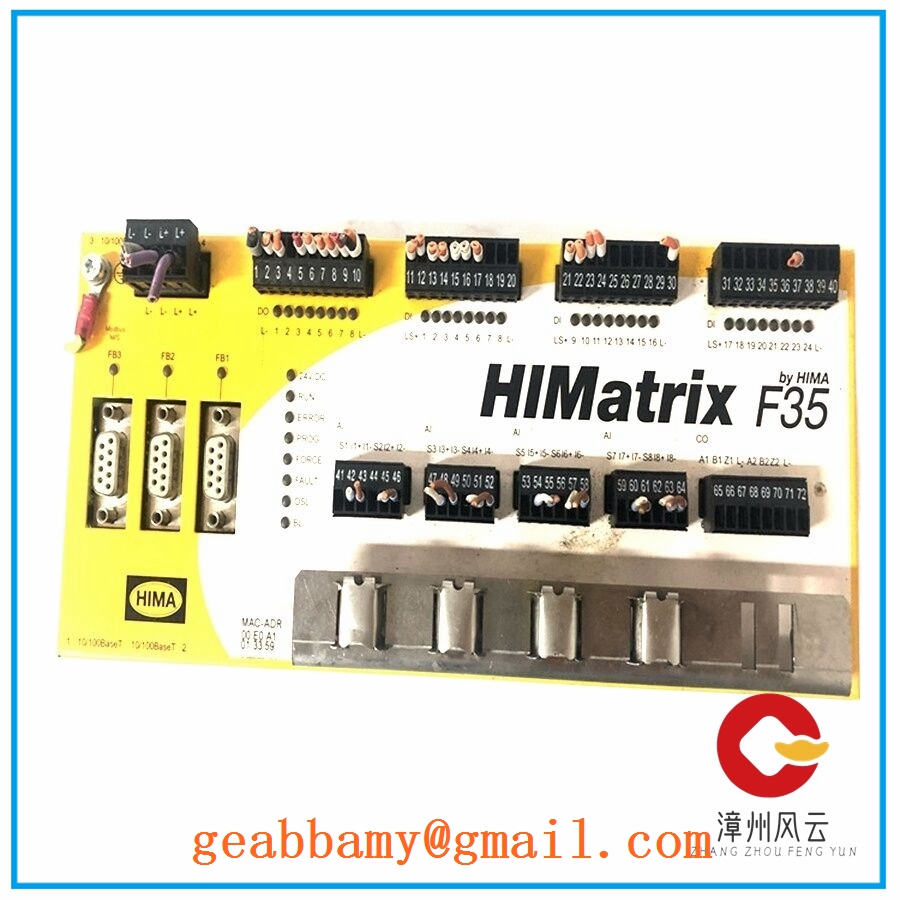
Model: HIMatrix F35 (exact suffix and ordering number to be confirmed)
Brand: HIMA (HIMA Paul Hildebrandt GmbH + Co KG)
Series: HIMatrix Safety-Related Controller
Core Function: Executes safety logic and monitors critical industrial signals
Product Type: Compact Safety PLC / Safety Controller
Key Specs: 24 digital inputs, 8 digital outputs, 8 analog inputs, 2 counters
Safety Certification: Up to SIL 3, depending on exact model and certified configuration
Supply Status: Subject to stock confirmation
Stock: Contact us for current inventory
Warranty: Subject to order confirmation
Ship From: China
Important identification note: F35 is available in multiple hardware and software variants. Confirm the complete type designation before ordering. F35 01, F35 011, F35 012, and F35 03 should not automatically be treated as interchangeable.
eic2.com+2
Manufacturer: HIMA
Product Family: HIMatrix
Model: F35
Digital Inputs: 24 safety-related digital inputs
Digital Outputs: 8 safety-related digital outputs
Analog Inputs: 8 unipolar analog input channels
Analog Voltage Range: 0–10 V DC
Analog Current Range: 0–20 mA with the appropriate external shunt
Counter Channels: 2 independent counters
Counter Input Levels: Configurable 5 V or 24 V
Supply Voltage: 24 V DC, allowable range -15% to +20%
Ethernet: Model-dependent; F35 variants can provide four RJ-45 Ethernet ports
Fieldbus: Variant-dependent fieldbus interfaces, including RS-485 configurations
Safety Rating: Up to SIL 3, subject to the applicable certification and system design
Operating Temperature: Depends on variant; standard F35 01 is 0 to +60 °C, while low-temperature variants support operation down to -20 °C
Mounting: Compact metal enclosure for industrial installation
Programming Software: SILworX or ELOP II Factory, depending on controller variant
The F35 manual specifies 24 digital inputs, 8 digital outputs, 8 analog inputs, and 2 counters. It also describes the different programming-tool variants.
eic2.com+2
In a Safety Instrumented System (SIS), a controller failure is more than an ordinary PLC maintenance issue. It can affect emergency shutdown logic, burner management, process interlocks, and other protective functions.
The HIMA HIMatrix F35 combines safety-related digital and analog signal processing in a compact controller. It is designed for applications where input monitoring, output switching, diagnostic information, and safety logic must work together.
One important distinction: replacing an F35 requires more than matching the number of I/O channels. The programming environment, safety configuration, firmware revision, and approved application architecture must also match.
1. Oil and Gas – Emergency Shutdown Systems (ESD)
Monitors emergency pushbuttons, pressure switches, gas detectors, and process interlocks. The controller executes configured safety logic and drives shutdown outputs when specified trip conditions occur.
2. Petrochemical – Safety Instrumented Systems
Handles safety-related signals from process equipment, including temperature, pressure, and level monitoring. It supports safety functions designed according to IEC 61511.
3. Power Generation – Burner Management Systems
Monitors burner permissives, flame-related interlocks, and shutdown signals within an appropriately engineered safety architecture.
4. Chemical Processing – Process Protection
Monitors critical process conditions and initiates predefined protective actions when configured limits are exceeded.
5. Offshore and Hazardous Industrial Installations
Applicable F35 variants support installation in specified hazardous-area environments, subject to enclosure, certification, and installation requirements.
Background:
An offshore processing facility operates a HIMA HIMatrix safety system monitoring gas detection and emergency shutdown signals.
Problem:
The maintenance team identifies an F35 controller fault. The affected safety application requires restoration without changing the established shutdown logic.
Solution:
The engineering team follows a controlled replacement procedure:
Records the complete controller ordering number.
Identifies the existing hardware and firmware revisions.
Backs up the approved safety application.
Verifies the replacement programming environment.
Checks all field wiring and Ethernet connections.
Validates the safety configuration and application checksum.
Performs documented proof testing before returning the system to service.
Result:
The replacement can preserve the existing system architecture when hardware, software, and safety application compatibility are confirmed.
The important point is that a safety controller must not return to service simply because its RUN indicator is illuminated. The complete safety function must pass the required validation.
There is no verified universal drop-in replacement for the HIMA HIMatrix F35.
Different F35 variants can have different hardware configurations, programming environments, and operating-temperature specifications.
| Model | Compatibility Level | Main Difference | Required Action |
|---|---|---|---|
| HIMA F35 01 | Conditional | Standard-temperature version | Verify exact hardware and software |
| HIMA F35 011 | Conditional | Low-temperature version, down to -20 °C | Verify ordering number and configuration |
| HIMA F35 012 | Conditional | Subsea/low-temperature variant | Verify enclosure and environmental requirements |
| HIMA F35 03 | Conditional | Different hardware and programming configuration | Verify system generation and application compatibility |
These are related product variants, not confirmed direct replacements.
chnfcs.com+2
HIMA HIMatrix F35 – Exact original variant
Best starting point for maintenance replacement.
Match the complete ordering number.
Confirm the existing firmware and programming environment.
Restore only an approved application backup.
Perform the required safety validation.
F35 01 / F35 011 / F35 012 / F35 03
Differences can include:
Operating-temperature range.
Hardware and enclosure construction.
Firmware and system generation.
Programming software compatibility.
Fieldbus and communication configuration.
A change between variants requires engineering review. Do not assume that the existing safety application can be downloaded without modification.
Before approving a replacement, request:
Photograph of the complete product label.
Exact ordering number.
Hardware and firmware revisions.
Existing programming environment: SILworX or ELOP II Factory.
Safety application backup and checksum information.
Ethernet and fieldbus configuration.
Existing I/O assignment and wiring drawings.
If the original variant is available at a reasonable price, I recommend retaining it. A controller substitution in an SIS can require considerable engineering and validation work.
| Fault Symptom | Possible Cause | Controller Relevance | Quick Check | Recommended Action |
|---|---|---|---|---|
| FAULT LED illuminated | Internal diagnostic fault or channel fault | High | Read controller diagnostics | Investigate reported error code |
| Controller fails to enter RUN | Application, configuration, or hardware fault | High | Check programming tool diagnostics | Verify application and controller status |
| Digital input not detected | Field wiring or input channel fault | Medium | Measure signal at the documented terminals | Check sensor, wiring, and input status |
| Digital output remains OFF | Interlock, overload, or output fault | High | Check output status and load circuit | Inspect load and output diagnostics |
| Analog value incorrect | Sensor, wiring, or configuration problem | Medium | Compare measured signal with controller value | Check transmitter and scaling |
| Ethernet communication lost | Network, cable, or configuration issue | Medium | Check link indicators and network diagnostics | Inspect switch, cable, and IP settings |
| Repeated controller restart | Supply instability or internal fault | High | Measure 24 V DC supply during operation | Check power supply and controller diagnostics |
| Counter value incorrect | Pulse wiring or input configuration | Medium | Check pulse level and frequency | Verify 5 V/24 V configuration |
1. FAULT LED Illuminated
Do not immediately replace the controller.
First:
Connect the approved HIMA programming and diagnostic tool.
Read the controller diagnostic information.
Identify the affected input, output, or internal function.
Record the associated error code.
Compare the result with the correct F35 manual.
The F35 manual describes channel-specific diagnostic information and fault reactions. The application must evaluate both signal values and associated error codes.
eic2.com+1
2. Digital Input Signal Not Detected
The F35 provides 24 digital inputs.
Check:
Measure the field signal at the corresponding input terminal.
Confirm the correct L- reference connection.
Inspect the sensor supply.
Check the individual input LED.
Read the channel diagnostic information.
For the documented F35 input configuration, the default digital thresholds are below 7 V for LOW and above 13 V for HIGH. Actual configured thresholds must be checked before diagnosing a channel.
eic2.com
3. Digital Output Does Not Activate
The F35 has eight safety-related digital outputs.
Check:
Verify the safety application’s output command.
Check the individual output LED.
Measure the output voltage using the correct terminal reference.
Inspect the connected actuator and wiring.
Check for overload or short-circuit diagnostics.
An important wiring detail: HIMA specifies using the corresponding L- ground for the respective output group when connecting a load to a single-pole switching output.
The output current ratings also differ by channel:
Channels 1–3 and 5–7: 0.5 A.
Channels 4 and 8: higher current capacity, subject to the specified temperature conditions.
Do not exceed the channel ratings.
plc-module.com+1
4. Analog Input Reading Is Incorrect
The F35 provides eight analog input channels.
Check:
Verify the transmitter’s output range.
Confirm 0–10 V DC or the appropriate current measurement configuration.
Check the external shunt adapter when measuring current.
Verify transmitter supply voltage.
Compare the raw input value with the configured engineering-unit scaling.
Read the analog input error code.
Do not replace the controller before checking the transmitter and field wiring.
5. Ethernet Communication Failure
The communication configuration depends on the F35 variant.
Check:
Ethernet cable condition.
RJ-45 link indicators.
Controller IP address.
Subnet and network configuration.
Switch port status.
Communication diagnostics in the programming software.
For a system connected to another PLC or SCADA platform, also verify the configured communication protocol and data mapping. Do not assume that every F35 variant supports identical communication options.
For a safety controller, our recommended inspection process must distinguish between physical condition, basic functional checks, and certified safety validation.
Stage 1 – Incoming Inspection
Verify the manufacturer and complete ordering number.
Check serial number and identification labels.
Review available original packaging and traceability records.
Inspect the enclosure for corrosion, impact damage, and deformation.
Check connectors and terminal interfaces.
Look for evidence of previous repairs or component replacement.
Verify supplied accessories and documentation.
Stage 2 – Functional Testing
Use a compatible HIMA HIMatrix test environment.
Apply the specified 24 V DC supply.
Record startup and diagnostic LED conditions.
Check controller communication.
Verify available digital input channels using approved signal simulation.
Verify digital output behavior using suitable test loads.
Simulate analog input signals within the documented range.
Check counter input operation.
Record the results in a functional Test Report.
A standard bench test does not establish SIL 3 performance or prove the complete safety application.
Stage 3 – Electrical Inspection
Verify supply polarity and voltage.
Inspect grounding and protective connections.
Check terminal integrity.
Inspect for contamination and damaged insulation.
Perform insulation testing only where the manufacturer permits it.
Do not apply a 500 V insulation tester directly to sensitive controller electronics.
Stage 4 – Firmware and Program Verification
Identify the installed hardware variant.
Record firmware and system revision.
Confirm whether the controller uses SILworX or ELOP II Factory.
Back up available configuration information.
Record communication parameters.
Verify application compatibility and checksum information.
Stage 5 – Final Quality Inspection
Record inspection results.
Obtain QC approval.
Place the controller in an antistatic bag.
Add protective cushioning.
Pack in a suitable carton.
Attach a QC Passed label with the inspection date.
Inspection photographs, available test records, and functional testing videos can be provided for customer review when generated for the actual unit.
Final Engineering Advice
One thing I always emphasize with safety controllers: a replacement PLC is not automatically an equivalent safety controller.
The HIMA HIMatrix F35 belongs to a safety-related control platform. Hardware compatibility, application validation, and safety lifecycle requirements all matter.
If you are replacing an existing F35, keep the original controller’s nameplate photograph, software version, and application backup together. Those three pieces of information can save a considerable amount of troubleshooting and commissioning time.
Reference documentation: HIMA HIMatrix F35 Safety-Related Controller Manual · HIMA F35 03 Manual · HIMA HIMatrix Product Overview