
Product Description
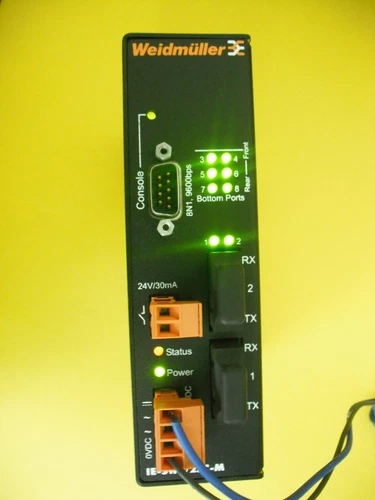
The Weidmüller IE-SW6/2SC-M Managed Industrial Ethernet Switch is designed for industrial network communication in automation systems, control cabinets, and distributed equipment installations.
With six RJ45 Ethernet ports and two SC fiber-optic ports, this switch supports both copper and multimode fiber connections. It provides network management functions for monitoring and organizing industrial Ethernet traffic, making it suitable for PLC networks, remote I/O systems, HMI communication, and other industrial control applications.
The switch supports management features including SNMP, Rapid Ring, IGMP Snooping, port mirroring, port filtering, trunking, VLAN, QoS, and TOS. An RS-232 interface is provided for configuration and management.
Its aluminum housing and DIN-rail mounting design make it suitable for industrial control cabinet installations.
Product Parameters
- Brand: Weidmüller
- Model: IE-SW6/2SC-M
- Order Number: 8845840000
- Product Name: Managed Industrial Ethernet Switch
- Product Series: Industrial Ethernet Managed Switches
- Product Type: Managed Ethernet Switch
- Ethernet Ports: 6 × RJ45
- Fiber Ports: 2 × SC Multimode
- Management Interface: 1 × RS-232
- Ethernet Speed: 10/100 Mbps
- Fiber Transmission: 100 Mbps
- Fiber Segment Distance: Up to 2 km (depending on fiber specifications)
- Input Voltage: 10–36 V DC / 8–24 V AC
- Maximum Input Power: 20 W
- Operating Temperature: -40°C to +75°C (catalog specification)
- Housing Material: Aluminum
- Dimensions: Approximately 156 × 44 × 164.5 mm
- Mounting: DIN Rail
- Place of Manufacture: Germany (manufacturer documentation identifies the product family as Made in Germany)
- Product Status: Not specified
- Weight: Not specified
- Country of Origin: Germany (manufacturer documentation)
- Discontinued: Not confirmed
Network Configuration and Commissioning
- Verify the model number IE-SW6/2SC-M and order number 8845840000.
- Mount the switch securely on the designated DIN rail.
- Connect the power supply according to the specified AC or DC input range.
- Connect industrial Ethernet devices to the six RJ45 ports.
- Connect compatible multimode fiber-optic cables to the two SC ports.
- Use the RS-232 management interface or supported web management interface to access configuration settings.
- Configure IP addresses, VLANs, port settings, and network management functions as required.
- Enable appropriate redundancy and traffic management features where supported by the network design.
- Check link indicators, communication status, and network connectivity before placing the system into operation.
Daily Maintenance and Care
- Inspect RJ45 and SC connectors for dust, contamination, or physical damage.
- Check fiber-optic cables for excessive bending, damaged jackets, and loose connections.
- Monitor Ethernet link status and network traffic.
- Review switch diagnostics and management alarms.
- Check the power supply and grounding connections.
- Maintain adequate cabinet ventilation and operating temperature.
- Back up network configuration settings before making changes.
- Keep unused ports protected against dust and accidental contact.
Troubleshooting and Common Problems
- No power: Check the input voltage, terminal connections, and power supply condition.
- RJ45 link failure: Inspect Ethernet cables, connector seating, and connected device settings.
- Fiber link failure: Check SC connector cleanliness, fiber polarity, cable type, and optical signal conditions.
- Network communication interruption: Review VLAN configuration, port settings, and connected device network parameters.
- Network loop or instability: Check Rapid Ring configuration and physical network topology.
- High network traffic: Review IGMP Snooping, QoS, and port filtering settings.
- Management access failure: Check the RS-232 connection, management interface settings, and network configuration.
Safety Precautions
- Installation should be performed by qualified industrial network technicians.
- Disconnect power before changing electrical connections.
- Use only power sources within the specified input range.
- Observe correct polarity when using DC power.
- Avoid looking directly into active fiber-optic ports.
- Do not connect incompatible multimode and single-mode fiber equipment.
- Back up the existing network configuration before changing management settings.
- Verify network redundancy and communication performance after commissioning.
Recommended Related Weidmüller Products
The following are related Weidmüller industrial Ethernet switches and accessories. They belong to the same general product family or application category and are not all direct replacements.
- IE-SW6/2SCS-M – Managed Switch, Single-Mode SC Fiber
- IE-SW6/2ST-M – Managed Switch, ST Fiber
- IE-SW8-M – Managed Industrial Ethernet Switch
- IE-SW14/2SC-M – Managed Switch with SC Fiber Ports
- IE-SW14/2SCS-M – Managed Switch, Single-Mode SC Fiber
- IE-SW14/2ST-M – Managed Switch, ST Fiber
- IE-SW16-M – Managed Industrial Ethernet Switch
- IE-SW22/2SC-M – Managed Switch with SC Fiber Ports
- IE-SW22/2SCS-M – Managed Switch, Single-Mode SC Fiber
- IE-SW22/2ST-M – Managed Switch, ST Fiber
- IE-SW24-M – Managed Industrial Ethernet Switch
- IE-SW6/2SC60-M – Industrial Ethernet Switch, Extended Fiber Distance
- IE-DPC – RJ45 Dust Protection Plug
- IE-C-NULLMODEM – Null Modem Cable
- Weidmüller Industrial Ethernet Connection and Fiber Accessories

